
Download iPod Video Converter for Free – Video Conversion, YouTube Download, FLV to iPod
Overview
The iPod Video Converter for Free is a utility designed to help users prepare video content for playback on iPod devices. Its primary function is to convert various video formats into a compatible format for iPods, enabling seamless viewing on the go. This tool is especially useful for individuals who frequently transfer videos from their computers to their iPods, including content from online sources like YouTube. By supporting formats such as FLV, AVI, and MP4, the app addresses the common challenge of format incompatibility that often prevents direct playback on portable media players.
Target users include casual viewers, digital content enthusiasts, and anyone seeking a straightforward way to convert and transfer videos without cost. While the developer’s background is not detailed in the provided information, the app has been available since 2011, indicating a long-standing presence in the mobile and desktop utility space. Real-world use cases include preparing educational videos, music clips, or personal recordings for offline viewing during travel or commutes.
Within the broader app ecosystem, iPod Video Converter for Free fills a niche by offering a no-cost alternative to commercial conversion tools. Despite the rise of streaming platforms, there remains a demand for offline video access, particularly in areas with limited connectivity. The app’s continued relevance underscores its value as a lightweight, focused solution for a specific but enduring need.
Key Features & Functionality
- Comprehensive Format Support: The app supports multiple video formats, including FLV, AVI, MP4, and others, ensuring compatibility with a wide range of source files. This feature allows users to convert videos from diverse origins, such as downloaded clips or files from social media platforms, into a format suitable for iPod playback.
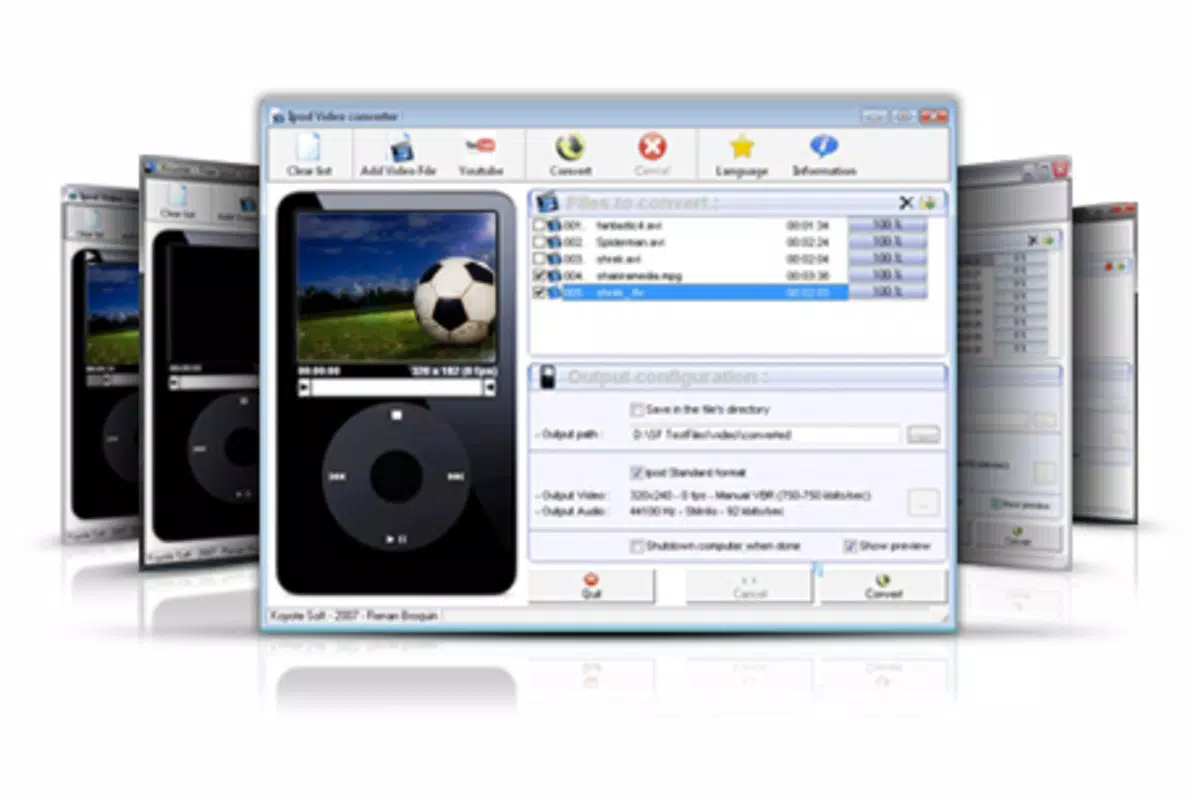
- User-Friendly Interface: Designed with simplicity in mind, the interface enables users to select a video file with minimal effort. The process is streamlined to just a few clicks, making it accessible even to those with limited technical experience.
- YouTube Video Conversion: Users can enter a YouTube URL directly into the app to download and convert videos for offline viewing. This feature is particularly valuable for individuals who want to enjoy content without relying on internet connectivity.
- Zero Cost Access: As the name suggests, the app is completely free to use. There are no subscription fees, in-app purchases, or feature locks, which makes it an appealing option for budget-conscious users seeking full functionality without financial commitment.
- Fast Conversion Speed: The conversion process is optimized for efficiency, allowing users to quickly prepare videos for transfer to their iPod. This reduces wait times and enhances the overall user experience, especially when processing multiple files.
For example, a student might use the app to convert lecture recordings from AVI format into iPod-compatible MP4 files. A traveler could download and convert a series of YouTube travel vlogs to enjoy during a flight. The app’s straightforward workflow ensures that users can focus on content consumption rather than technical hurdles.
Interface, UX & Performance
The user interface of iPod Video Converter for Free is designed with simplicity and functionality in mind. It features a clean layout with clearly labeled buttons and intuitive navigation, allowing users to select source files, choose output settings, and initiate conversion without confusion. Visual feedback during the conversion process helps users track progress, enhancing transparency and usability.
Navigation is straightforward, with minimal steps required to complete a conversion task. The app does not appear to include complex settings or advanced options, which contributes to its ease of use. Although the developer did not list formal performance metrics, the app is described as efficient, suggesting it operates smoothly on standard computing environments. Responsiveness is likely maintained across mid-range and older systems, given its long availability since 2011.
Stability is a notable aspect, as the app has remained in use for over a decade. While specific data on crashes or errors is not provided, its longevity implies consistent performance under regular use. The lack of reported issues in the description further supports its reliability. However, users should be aware that the app may not be optimized for the latest operating systems, particularly if updates have not been released recently.
Platform Compatibility & Technical Requirements
The app is available for desktop platforms, though specific operating system details are not provided. It is not currently confirmed whether the tool is available as a mobile app or exclusively for desktop use. The file size is not listed, so users cannot assess storage requirements based on the given data. The version number and release date are known: the app was released on January 27, 2011.
The developer did not specify minimum OS requirements or compatibility with modern systems. As such, users should verify whether the application runs on their current device configuration. The absence of recent updates may affect compatibility with newer versions of Windows or macOS, especially if the app relies on outdated libraries or APIs.
Pros and Cons
Pros
- Completely free to use with no hidden fees or in-app purchases
- Supports a wide range of video formats, including FLV and AVI
- Simple, intuitive interface suitable for non-technical users
- Allows direct YouTube video conversion via URL input
- Fast conversion process reduces waiting time
Cons
- Release date is from 2011; no recent updates have been reported
- Platform availability (mobile vs. desktop) is not clearly defined
- Specific technical requirements, such as OS version or file size, were not disclosed
- Compatibility with modern operating systems cannot be confirmed
- Limited information on support, updates, or developer activity
FAQ
Is iPod Video Converter for Free safe to download and use?
While the app is described as free and functional, the developer did not provide information on security certifications or digital signatures. Users should ensure they download from trusted sources and scan the file with antivirus software before installation.
Can I use this app on my smartphone?
The app’s platform is not clearly specified. Based on its release date and typical usage patterns, it is likely designed for desktop computers. Mobile compatibility has not been confirmed.
Does the app support the latest video formats?
It supports FLV, AVI, MP4, and other common formats. However, support for newer or emerging video codecs has not been detailed.
Are there any updates available for this app?
The last known release was in 2011. No recent updates have been reported, which may affect compatibility with current systems.
Can I convert videos from YouTube using this tool?
Yes, the app allows users to input a YouTube URL to download and convert videos for offline viewing on an iPod.
Final Thoughts
Ipod Video Converter for Free remains a notable tool for users seeking a no-cost solution to convert videos for iPod playback. Its straightforward interface and support for popular formats like FLV and MP4 make it accessible and practical for everyday use. While its age raises concerns about compatibility with modern systems, its core functionality continues to serve a specific audience—those who value offline video access without financial investment.
For individuals with older devices or those who prefer lightweight desktop utilities, this app offers a reliable way to transfer content from various sources to their iPod. It stands out in a market dominated by paid tools by delivering full functionality at no cost.
Download iPod Video Converter for Free now


